
In this guide
Why this matters
CoTreat Packs work best when they are used consistently across the team.
This framework helps clinics:
-
Send CoTreat Packs reliably after treatment conversations
-
Improve patient understanding and confidence
-
Reduce reliance on memory, paper, or rushed explanations
-
Create simple, repeatable habits across roles
-
Save time while improving follow-up and treatment acceptance
CoTreat should feel like the natural next step after a treatment conversation, not an optional extra.
Who this is for
Any team member involved in patient follow-up, including:
-
Dentists
-
Treatment Coordinators
-
Reception / Front Desk
-
Other team members who support patient communication
CoTreat Packs may be sent by Reception, a Treatment Coordinator, or another support role.
Dentists rarely send plans themselves - their role is to set direction, not manage follow-up. Dentists continue to assess, treatment plan, and quote as usual in the PMS.
The Standard CoTreat Workflow (At a Glance)
-
Dentist discusses treatment with the patient
(Clinical assessment and treatment planning continues in the PMS as usual.) -
Dentist sets the expectation that a CoTreat Pack will be sent
-
Dentist advises which images or content matter most
-
A team member sends the CoTreat Pack on the same day
-
The team explains what the pack includes and what happens next
-
Follow-up is managed using Conversations and the Pipeline
This workflow is designed to be repeatable, low-friction, and scalable.
1. When to Send a CoTreat Pack
A CoTreat Pack should be sent for most appointments where a treatment conversation takes place.
Always send a pack when:
-
A treatment opportunity is identified
-
A cosmetic or elective discussion occurs
-
A decision or consideration is required
-
Visuals (scans, photos, X-rays) would help understanding
-
The patient says:
-
“Can you send me the details?”
-
“Can I think about it?”
-
“Can I look at this at home?”
-
Internal rule of thumb
If a treatment conversation happened, a CoTreat Pack should follow.
Acceptable exceptions
Some appointments do not require a new pack:
-
Purely procedural follow-up treatments
-
No new information or decision required
2. What to Send
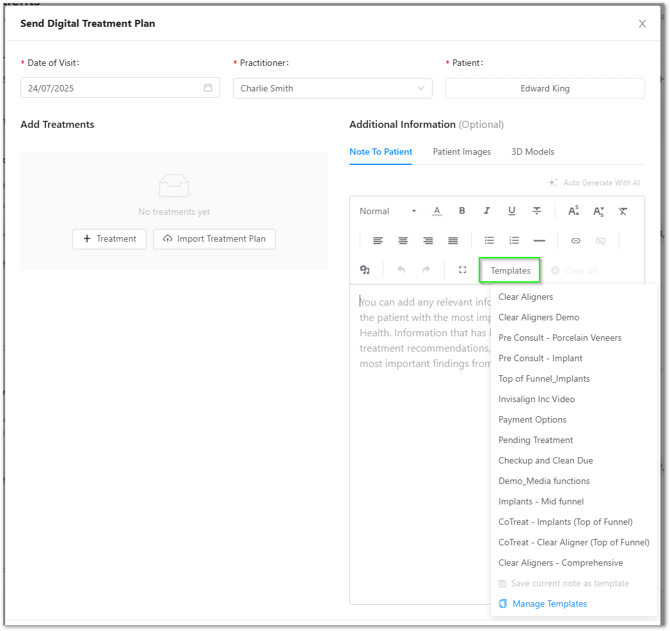
Use templates as the default
Templates:
-
Save time
-
Reduce friction
-
Ensure consistency across the clinic
Dentist responsibilities (content guidance)
Dentists do not need to send the pack.
Their role is to:
-
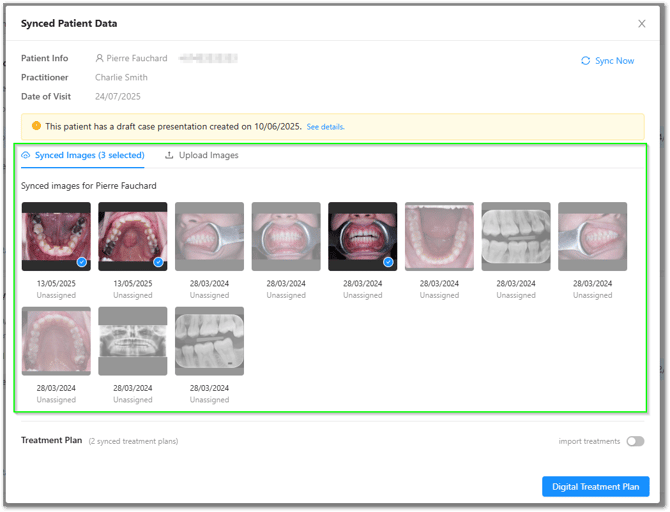
Indicate which 1–3 key images to include (X-rays, scans, photos)
-
Confirm which plan type applies:
-
Oral health
-
Aesthetic / elective
-
Or both
-
-
Reinforce verbally that the plan will be sent digitally for review
This keeps dentists focused on clinical care while ensuring plans are accurate and relevant.
3. How to Introduce the CoTreat Pack
How the pack is introduced directly affects:
-
Whether it’s opened
-
Patient confidence
-
Follow-up engagement
Dentist positioning (chairside)
Dentists briefly set expectations during the appointment.
Example:
“We’ll send you a personalised CoTreat Pack after today with your images, the options we discussed, and clear next steps so you can review everything properly in your own time.”
This primes the patient to expect and value the pack.
Team introduction (when sending)
Standard script (most appointments):
“I’ve just sent you your CoTreat Pack. It includes your images, the treatment options discussed today, and what the next steps could look like. You can review it now or at home when it suits you.”
Aesthetic or elective treatments:
“Once you open it, you’ll see your scans and a visual breakdown of your options. Most patients find this much clearer than trying to remember everything from the appointment.”
If the patient says ‘I’ll think about it’:
“That’s exactly why we send this — it gives you something clear to review at home, without relying on memory or notes.”
Supportive. Calm. No pressure.
4. Follow-Up: Conversations & Pipeline
Sending the pack is the starting point, not the end.
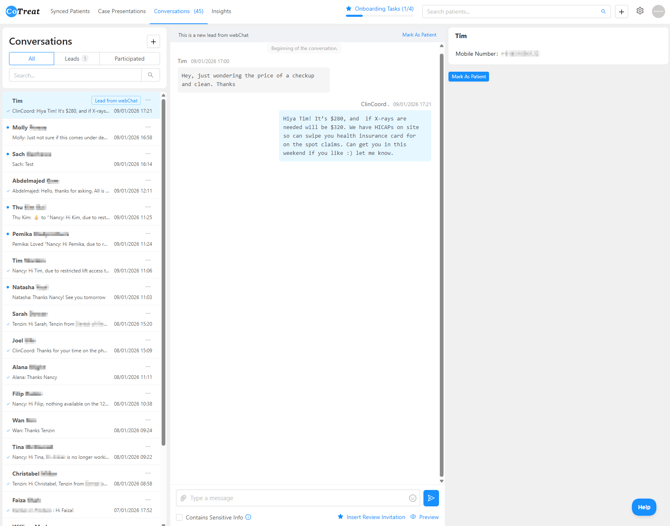
Conversations
-
Monitor patient replies and questions
-
Respond to clarification requests and next-step discussions
This reduces phone tag and unnecessary chasing.
Pipeline (tracking progress, not pressure)
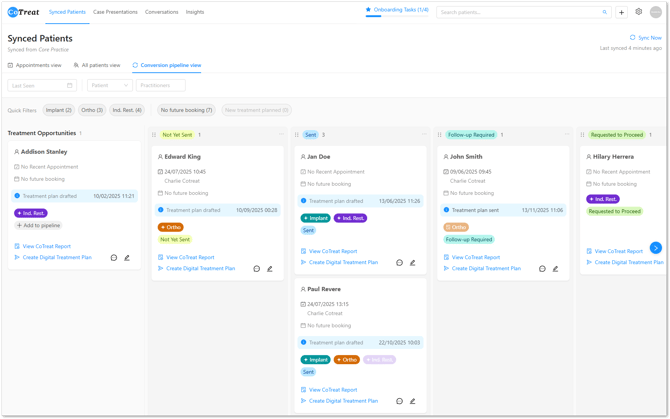
The Pipeline helps teams see where each patient is and what to do next.
Common stages include:
-
Not yet sent
-
Sent
-
Follow-up required
-
Requested to proceed
-
Booked
-
Not proceeding (for now)
Why this matters
-
Creates visibility without chasing
-
Helps prioritise follow-up
-
Supports smooth handover between team members
-
Allows leadership to support adoption without micromanaging
The pipeline is about clarity, not chasing.
5. Building Habits (What Success Looks Like)
The goal is to make CoTreat easy to start, then improve over time.
Early focus
-
Send the pack
-
Use templates
-
Use the script
-
Update the pipeline
Over time, this leads to:
-
Higher send rates
-
Better patient engagement
-
Clearer follow-up
-
More confident conversations
-
Less manual chasing and re-explaining
Need help?
If you’d like a hand or something doesn’t look right, our support team is happy to help.