
You can create and send Info Packs and Digital Treatment Plans in CoTreat in just a few minutes, even if your practice is not integrated with a PMS or is using image-viewer only.
This workflow is ideal when:
-
You want to educate patients about a treatment option
-
You’ve had a quick conversation and want to seed awareness
-
You’re ready to reinforce benefits and next steps before booking or proceeding
📹 Video available: For a step-by-step walkthrough watch this video here.
Table of Contents
1. When to Send an Info Pack vs a Treatment Plan
Info Pack (no treatments added):
-
Use when introducing a treatment option
-
Focus on benefits and outcomes
-
Ideal for awareness and interest
Digital Treatment Plan (with treatments added):
-
Use when the patient is ready to consider costs and next steps
-
Supports consent and decision-making
-
Ideal before booking or proceeding
💡 You don’t need to include everything at once — send the right level of detail for where the patient is in their journey.
2. Create a New Digital Treatment Plan
-
Click the + button in the top-right corner of CoTreat
-
Select Digital Treatment Plan
You’ll then be prompted to enter:
-
Date of visit
-
Practitioner (who the plan is sent from)
-
Patient (select an existing patient or create a new one)
3. Add Treatments (Optional)
Adding treatments is optional and depends on the purpose of the pack.
You can:
-
Click + Treatment to manually add items
-
Import treatments from a PDF exported from your PMS (if supported)
If you’re only sending an Info Pack to build awareness, skip this step and focus on education instead.
4. Add Treatment/Pack Information
In the Additional Information section, use Note to Patient to explain the treatment clearly and simply.
You can choose what works best for your workflow:
-
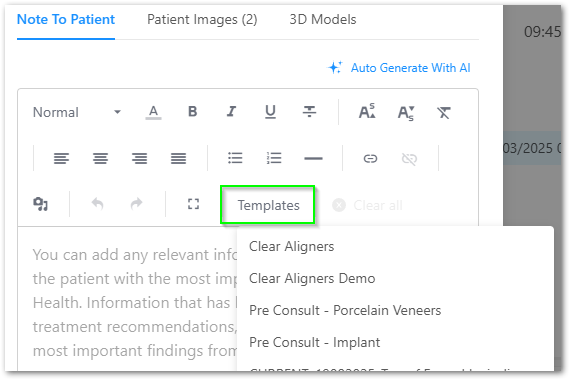
Templates
Use CoTreat’s starter templates or your own branded designs-
Templates can include images or graphics created in tools like Canva or Photoshop
-
Upload as PNG or JPEG and reuse across patients
-
- Auto-generate with AI
Instantly converts treatment items into patient-friendly language
You can edit the wording before sending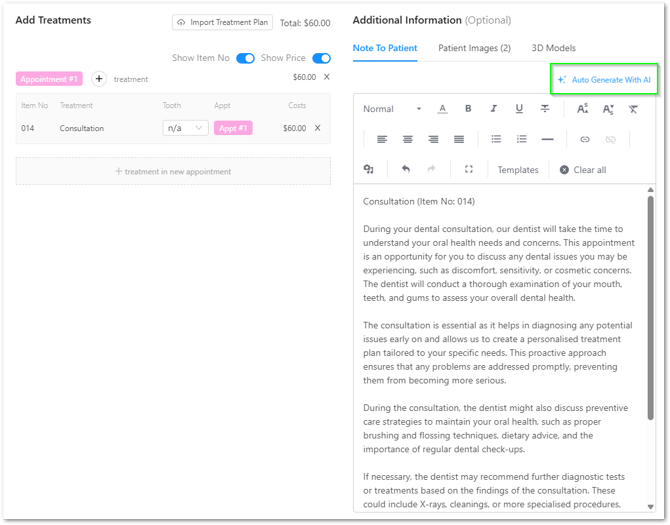
- Free text
Type directly or paste from dictation
(Save commonly used notes as templates)
5. Add Patient Images & 3D Models (Optional)
Images help patients engage more deeply with their plan.
You can:
-
Upload or drag-and-drop X-rays and photos
-
Add 3D models (highly engaging for patients)
Only include images that support understanding — clarity is more important than volume.
6. Preview and Send to the Patient
-
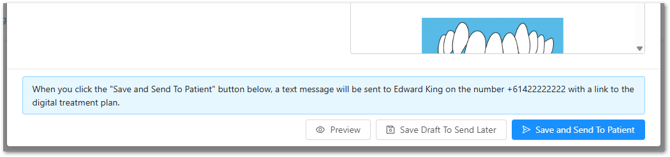
Click Preview to review the plan as the patient will see it
-
When ready, click Save and Send to Patient
The patient will receive an SMS with a secure link to view their Info Pack / Digital Treatment Plan.
If you’re not ready to send yet:
-
Click Save Draft to Send Later
7. Best Practice Tips to Increase Patient Engagement
-
Tell the patient they’ll receive an SMS before sending
-
Encourage them to reply directly if they have questions
-
Check whether the plan has been opened and how long it was viewed
-
Follow up with patients who haven’t booked or proceeded
You can track:
-
View status
-
Time spent reviewing
-
Sections viewed
This helps guide timely and relevant follow-ups.
Summary
Using CoTreat without a PMS integration, you can still:
-
Send professional, patient-friendly Info Packs
-
Share Digital Treatment Plans via SMS
-
Educate patients without overwhelming them
-
Support better conversations and confident decisions
If you need help exporting treatment plans or setting up templates, click the Help icon in CoTreat or contact the support team.