
Overview
If you’re experiencing issues with your Dental4Windows (D4W) and/or Centaur MediaSuite (CMS) integration, follow the steps below to identify and resolve common problems.
If you’re unable to resolve the issue after completing these checks, please click the Help icon in CoTreat to contact our support team.
Step 1: Check Integration Status
Start by confirming whether CoTreat can see your integration correctly.
-
Click Settings ⚙️
-
Select Integration
-
Open the Overview tab
What to look for
-
If all integrations show Operational but data is still not syncing, click the Help icon to contact support.
-
If you see an Integration error, continue to Step 2.
Step 2: Confirm D4W and CMS Are Running
The integration requires Dental4Windows and (if used) Centaur MediaSuite to be running.
-
Check that Dental4Windows (D4W) is open and running
-
Check that Centaur MediaSuite (CMS) is running (if applicable)
If either application is not running, proceed to Step 3.
Step 3: Restart D4W and CMS (If Needed)
If D4W and/or CMS are not running or appear unresponsive:
-
Use the Centaur start/stop interface to restart the services
-
Avoid manually shutting down servers where possible
Once restarted, return to Settings → Integration → Overview in CoTreat and check the status again.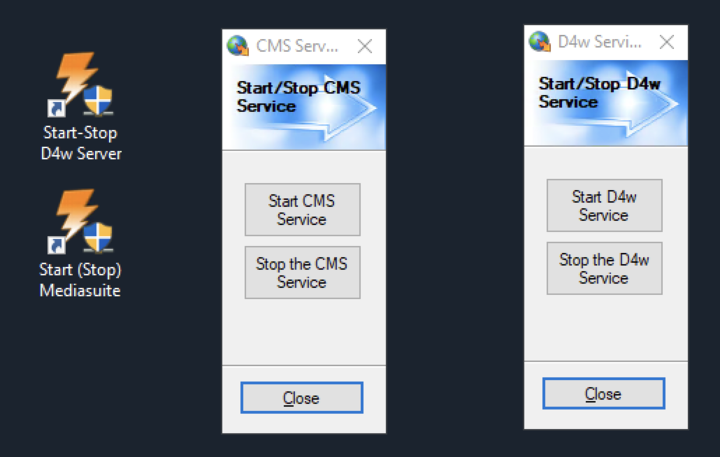
Preventing Future Integration Issues
To reduce the chance of integration interruptions, we recommend:
-
Keeping your server computer switched on
-
Following any Centaur recommendations for server restarts
-
Using the start/stop interface when restarting services rather than powering systems off
Still Need Help?
If you’ve completed all steps above and the issue persists:
-
Click the Help icon in CoTreat
-
Our support team will review your integration and assist further
Summary
This guide helps you:
-
Check your D4W/CMS integration status
-
Restart services safely if needed
-
Prevent common causes of integration disruption
If the issue can’t be resolved with these steps, our support team is ready to help.